Working example + reusable specification
JSON Formatter and Validator AI Prompt
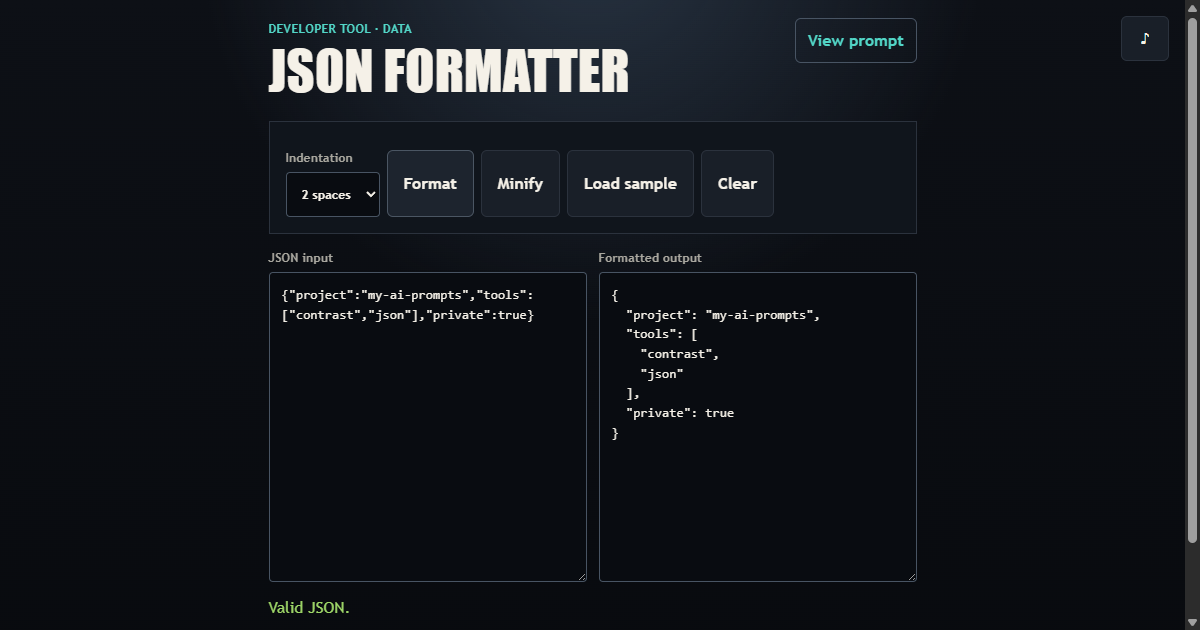
Build a local-only JSON utility that validates strict JSON, explains malformed input, formats or minifies valid documents, and exports safe text output.
01 / What it builds
A complete interaction, not a loose concept
Copy a detailed AI coding prompt for a private browser JSON formatter and validator with error locations, indentation, minification, download, and tests.
- Strict JSON parsing and useful syntax feedback
- Two-space, four-space, and tab indentation
- Minify, copy, sample, clear, and download actions
- Ephemeral input with no storage or analytics content
02 / Complete prompt
Copy the build specification
Project: JSON Formatter and Validator

Objective
Build a private, browser-only tool that validates strict JSON, formats or minifies valid documents, explains errors, and lets users copy or download the result.

Functional Requirements
- Accept JSON text in an editable source area and render output in a separate read-only area.
- Validate with strict JSON rules and show a useful syntax message with line and column when the browser exposes a character position.
- Format valid JSON with two spaces, four spaces, or tabs and minify it without changing parsed data.
- Provide sample, clear, copy-output, and download-as-JSON actions.
- Support Ctrl+Enter or Cmd+Enter as a formatting shortcut.
- Enforce a documented input-size limit and reject oversized documents without freezing the interface.

Technical Requirements
- Use semantic HTML, responsive CSS, and vanilla JavaScript with native modules.
- Keep parsing, error-location derivation, formatting, minification, and size validation independent from DOM and file-download effects.
- Render all entered content through textarea values or textContent; never interpret it as HTML.
- Keep input and output in memory only. Do not place document content in URLs, localStorage, analytics, logs, or generated markup.

Accessibility and Responsive Behavior
- Give both editors visible labels, connect validation feedback to the source editor, and expose invalid state with aria-invalid.
- Provide visible focus, 44px minimum command targets, live status feedback, and keyboard operation for every action.
- Stack editors on narrow screens without horizontal overflow and keep readable editor dimensions on desktop and short landscape layouts.

Acceptance Criteria
- Valid objects, arrays, strings, numbers, booleans, and null values preserve their parsed meaning after formatting and minification.
- Invalid JSON never produces output and receives an explicit error message.
- Formatting honors the selected indentation and minification removes insignificant whitespace.
- Oversized input is rejected before parsing.
- Copy fallback selects the output when Clipboard API access fails; download produces an application/json file.
- Automated tests cover valid types, malformed input, indentation, minification, size limits, keyboard formatting, privacy constraints, and mobile layout.

Deliverables
- The complete formatter and validator as the primary experience, not a landing page.
- Modular domain and browser-controller source with focused automated tests.
- No backend, account, runtime dependency, persistence, or transmission of document content.

Provided by www.my-ai-prompts.com